
Author: Kadence Leung
Last Update:2026/02/18
Introduction
The Custom Audience model allows you to create tailored AMC audiences based on specific shopper behaviors and characteristics—all without writing a single line of SQL or AMC code. Unlike fixed templates, this feature offers granular control over the logic that defines your target segments.
With Custom Audience, you define:
-
Behaviors: Include impressions, clicks, or specific conversion events.
-
Frequency: Set thresholds for how often a behavior must occur to qualify.
-
Logic: Combine behaviors using AND / OR / Exclude operators.
-
Windows: Set flexible lookback periods from 7 days up to 5 years.
-
Type: Choose between precision Rule-Based audiences or scalable Lookalike expansions.
Who Needs Custom Audience
While templates provide a convenient starting point, they are often too rigid for sophisticated media plans. Custom Audience acts as a "blank canvas" for advertisers with a specific strategic hypothesis that requires precision beyond standard out-of-the-box logic.
This feature is ideal for teams that need to move beyond basic retargeting to build high-performance segments. You should use Custom Audience if you:
-
Execute Specific Funnel Strategies: You have a unique methodology for moving users from awareness to conversion that standard templates cannot replicate.
-
Require Multi-Behavioral Precision: You need to combine different shopper actions—such as a specific number of ad exposures paired with a Brand Store visit—into a single targetable segment.
-
Manage Unique Product Lifecycles: Your products (e.g., luxury goods or high-end appliances) have long consideration phases that require custom lookback windows (up to 5 years) and specific exclusion logic.
-
Seek Self-Service Advanced Targeting: You want to build complex, SQL-level audiences without the bottleneck of relying on a dedicated data engineering team.
-
Scale Proven Seed Audiences: You have a high-performing rule-based audience and want to use Amazon’s lookalike algorithm to expand your reach into similar high-intent shoppers.
Operational Guide: How to Use It
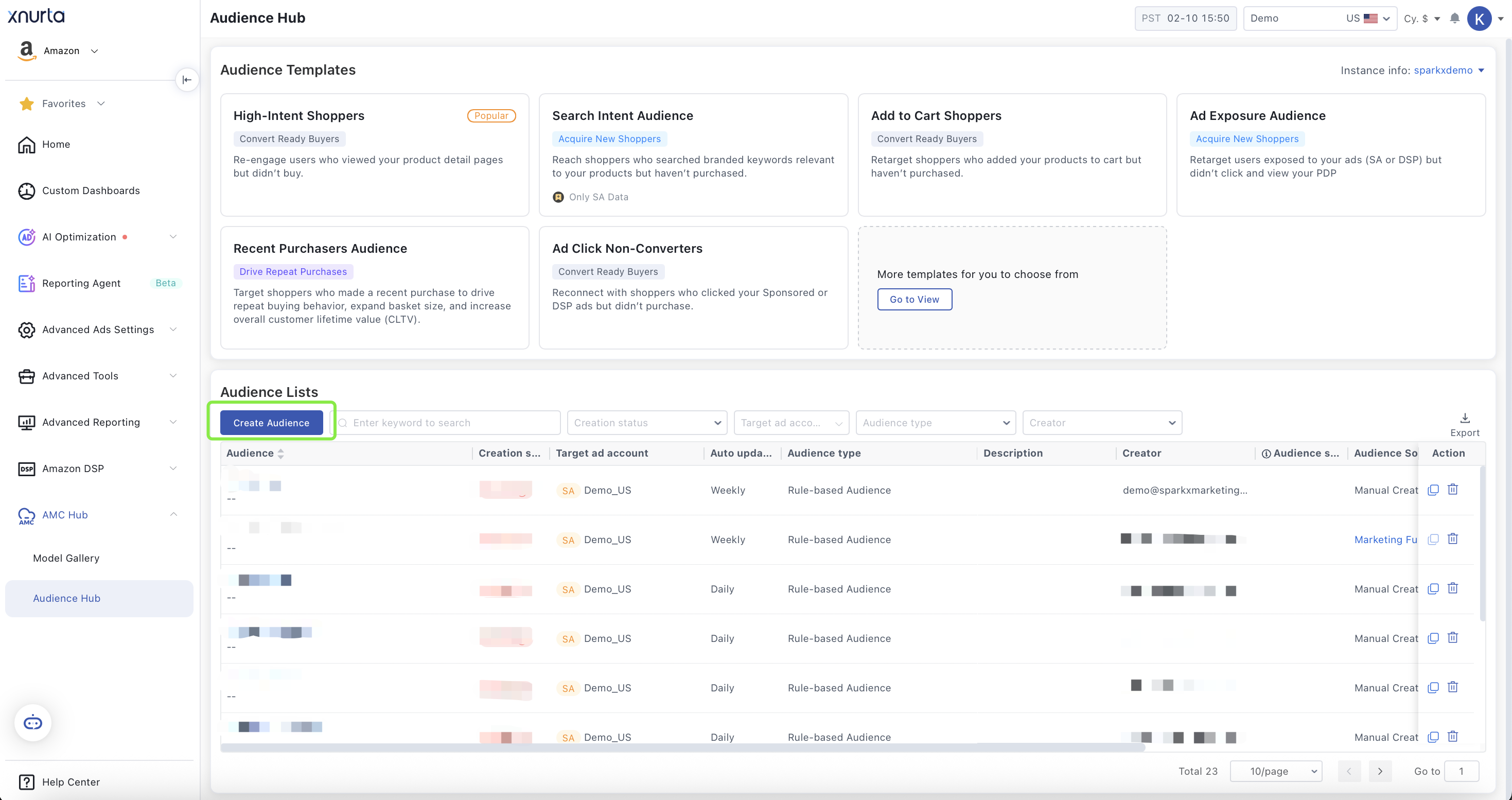
To enter the creation suite, navigate to the Audience Hub and click Create Audience, or select a template and choose Customize. The interface is split into two primary areas:
-
Top Section: Basic setup (Account, Update Method, Audience Type).
-
Bottom Section: Rule Configuration (Behavior logic and filters).
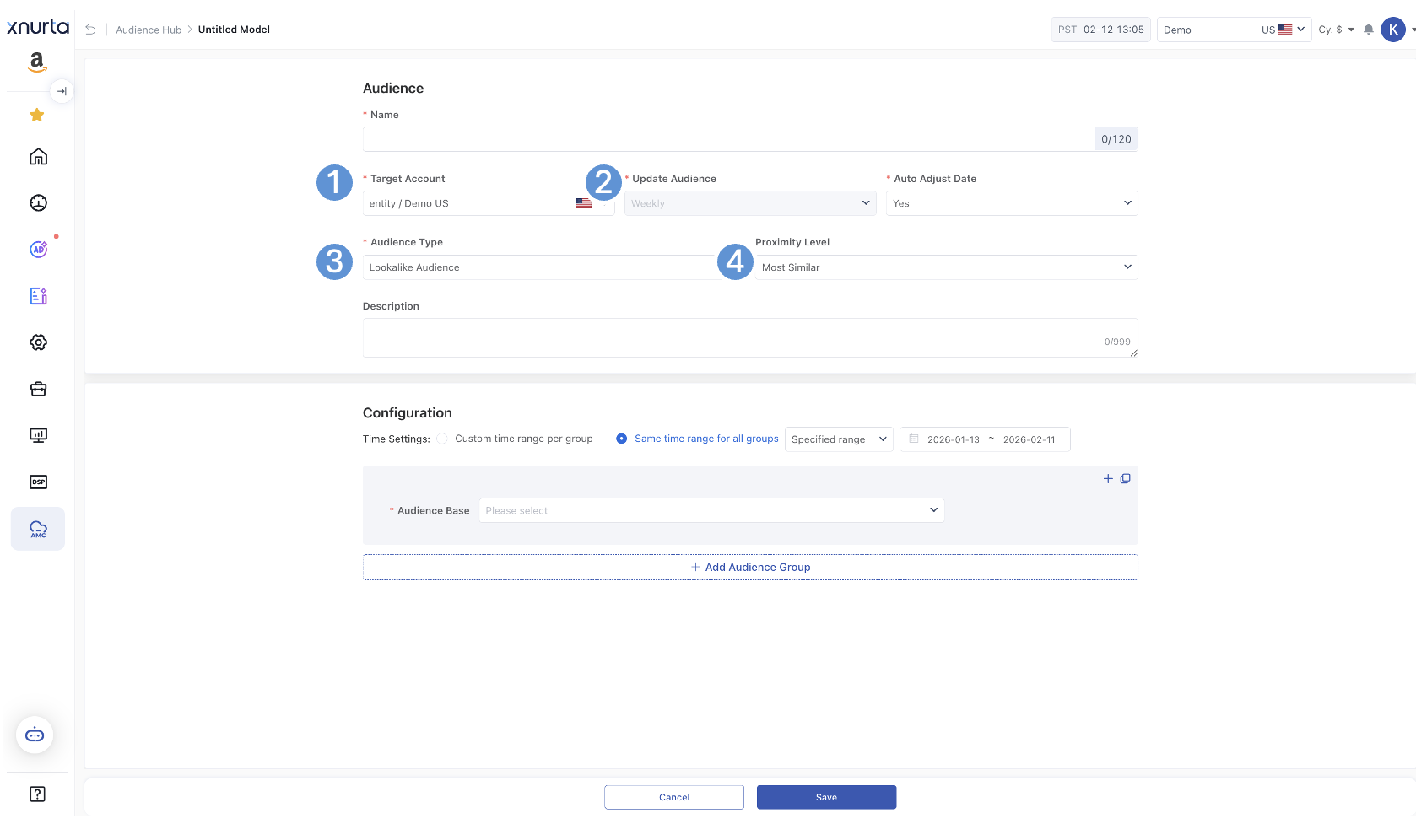
Audience Basic Settings (Top Section)
This section defines how your audience behaves over time and where it will be used.
|
Section |
Goal |
Tips |
Target Account |
Select the Sponsored Ad Entity or DSP advertiser where this audience will be pushed. |
|
Update Audience + Auto Adjust Date |
ON: For always-on retargeting/evergreen funnels.
OFF: For one-time tests or historical cohort analysis. |
Keep Auto Update off for Prime Day post-mortems to "freeze" the shopper list. |
Audience Type |
Rule-Based: Exact matches Lookalike: Algorithmic expansion (Prospecting)
|
Start with Rule-Based to capture high-intent users, then expand via Lookalike once the seed is proven. |
Lookalike Proximity Levels
When choosing a Lookalike audience, select your balance of scale vs. precision:
-
Most Similar: Highest precision; best for lower-funnel performance.
-
Balanced: The recommended starting point for most scaling efforts.
-
Most Broad: Maximum reach; best for upper-funnel brand awareness.
Audience Rule Configuration (Bottom Section)
This section defines who qualifies for your audience.
You build your audience using:
· Lookback window ( Optional: Different time windows per group)
· Audience Base (the core behavior)
· Configuration frequency
· AND / OR / Exclude logic
Think of this section as building filters layer by layer.

Time Settings
Choose how the lookback window applies to your behavioral groups:
-
Same time range for all groups: Simplifies logic for standard retargeting.
-
Custom time range per group: Allows for complex logic (e.g., "Users who clicked in the last 7 days AND purchased in the last 2 years").
Select Audience Base
A. Audience with Impressions
Target users based on ad exposure, regardless of engagement.
| Configuration | Goal | Tips |
DSP – Impressions |
Target users based on total DSP ad exposure. |
• Use for awareness or prospecting orders.
|
DSP – Viewable Impressions |
Target users based on viewable DSP exposure (met viewability standards). |
• Higher-quality exposure signal than total impressions.
|
Sponsored Ads – Impressions (SP / SB / SD) |
Target users based on Sponsored Ads exposure. |
• Filter by Ad Type (SP / SB / SD) to isolate format performance.
|
B. Audience with Clicks
Target users who showed active intent by clicking an ad.
| Configuration | Goal | Tips |
DSP – Clicks |
Target users who clicked DSP ads. |
• Ideal for conversion recovery campaigns.
|
Sponsored Ads – Clicks (SP / SB / SD) |
Target users who clicked Sponsored Ads. |
• Use campaign-level filtering to isolate competitor, non-brand, or auto campaigns.
|
C. Audience with Conversion Event
(The guidance below applies to the following Audience Base options: Audience with Conversion Event, Audience with Conversion Event (Non Ad Exposed Audience Included), and Audience with Conversion Event (Non Ad Exposed Audience only).
This audience type captures the strongest behavioral signals, making it ideal for performance-driven strategies.
| Configuration | Goal | Tips |
Detail Page View |
Target shoppers who clicked and spent time viewing your product detail page (PDP). |
• Indicates strong purchase interest.
|
| Shopping Cart | Target shoppers who added a product to cart. |
• High-intent segment for cart recovery. |
| Customer Review | Target shoppers who left a review. |
• Indicates strong engagement and product experience. |
| WishList | Target users who saved products. |
• Signals future purchase intent. |
| Baby Registry / Wedding Registry | Target users who added products to registry. |
• High planned purchase intent. |
| Order | Target users who completed a purchase or more. |
• Target shoppers with multiple orders within a year for loyalty campaigns. |
| New to Brand |
Target shoppers who purchased your brand for the first time in the last 365 days (Amazon-defined).
|
• Nurture first-time buyers to increase repeat purchase rate. |
| Brand Search (DSP-Only Data) | Target users who searched your brand via DSP data. |
• Indicates strong brand intent. |
| Keyword Search (SA-Only Data) | Target shoppers who searched specific keywords and were exposed via Sponsored Ads. |
• Use competitor or category keywords for conquesting strategies. |
| Subscribe & Save | Target shoppers who subscribed to recurring purchases. |
• High lifetime value segment. |
D. Audience with Conversion Event (Brand Store)
Retarget based on engagement depth within your Amazon Brand Store.
| Configuration | Goal | Tips |
Page View |
Shopper visited your Brand Store page(s) (broad reach) |
Best for: Store retargeting. |
Page Scroll |
Capture shoppers who explored beyond the top of the Store page. |
Best for: higher engagement than views. How to set: • Lookback: Last 14–30 days • Combine with AND Page View if you want to ensure Store visitors only • Add Exclude Order for performance-focused retargeting
|
| Page Click | Capture shoppers who interacted with Store modules/navigation. |
• Consideration-stage signal. • Lookback: Last 7–14 days for strongest intent. • Great seed audience for Lookalike expansion.
|
| Video Play | Capture shoppers who played a Brand Store video. |
Best for: higher engagement than views. How to set: • Lookback: Last 30-90days • Select a watch threshold (recommended: Watched at least 50% • Add Exclude Order for performance-focused retargeting |
| ASIN Click | Capture shoppers who clicked a product from the Brand Store (highest Store intent). |
• Strongest Store signal for conversion retargeting. • Lookback: Last 7–14 days. • Combine with Exclude Order for “clicked product but didn’t buy” audiences.
|
E. Audience with Conversion Event ( Audience Segment Insight)
Reach net-new shoppers who have not interacted with your brand.
| Configuration | Goal | Tips |
| High-value audience segment | Target the most brand-relevant segments based on Xnurta’s relevance calculation. |
Best for: efficient net-new acquisition. • Add ASINs if your brand sells in multiple categories to improve relevance • Exlucde brand viewers/ purcahsers to drive new to brand traffic |
| Audience segment | Build a net-new prospecting audience using Amazon-defined segments that align with your shopper persona or category intent. |
Best for: persona targeting + category expansion / cross-sell. How to set: • Region: pick the marketplace/region you’re advertising in (ex: Americas / US). • Segment Type: start with In-Market when you want shoppers actively considering a category. • Select segments: choose 3–8 segments to start; tighten later if performance is too broad. • Search: use keywords (e.g., “skincare”, “supplements”, “pet”, “kitchen”) to quickly find relevant segments.
|
F. Audience with 5-year Purcahse Event
AMC-exclusive capability to reach shoppers beyond the standard 365-day window.
| Configuration | Goal | Tips |
| Order | Re-engage shoppers who purchased (not limited to the past 365 days). |
Best for: win-back campaigns, upgrades/replacements, and long consideration cycles (e.g., appliances, premium electronics, outdoor equipment). Differentiate value: use Total Product Sales to separate high spenders vs. lower spenders (e.g., “Total Product Sales ≥ $X”). Avoid overlap: Exclude recent purchasers (e.g., exclude “Order in last 30/60/90 days”) so you focus on truly lapsed shoppers.
|
;}.cls-2{fill:%230868f7;}.cls-3{fill:url(%23未命名的渐变_44);}.cls-4{fill:%23333;}%3c/style%3e%3clinearGradient%20id='未命名的渐变_8'%20x1='33.73'%20y1='100.61'%20x2='-0.03'%20y2='-1.06'%20gradientUnits='userSpaceOnUse'%3e%3cstop%20offset='0'%20stop-color='%237ae9fb'/%3e%3cstop%20offset='0.67'%20stop-color='%232b90f8'/%3e%3cstop%20offset='1'%20stop-color='%230868f7'/%3e%3c/linearGradient%3e%3clinearGradient%20id='未命名的渐变_44'%20x1='27.86'%20y1='18.67'%20x2='68.36'%20y2='22.22'%20gradientUnits='userSpaceOnUse'%3e%3cstop%20offset='0'%20stop-color='%235ac7f2'/%3e%3cstop%20offset='1'%20stop-color='%230868f7'/%3e%3c/linearGradient%3e%3c/defs%3e%3cpath%20class='cls-1'%20d='M29,28.74V81.91l-9.51-3.68v0L8.52,74A7.17,7.17,0,0,1,4,67.32V24.54A3.76,3.76,0,0,1,9.08,21Z'/%3e%3cpath%20class='cls-2'%20d='M68.09,78.07a13.15,13.15,0,0,1-17.9,12.06L29,81.91h0V28.74L50.19,37A13.17,13.17,0,0,0,68.08,25.3h0Z'/%3e%3cpath%20class='cls-3'%20d='M68.08,25.3a13.19,13.19,0,0,1-6.73,10.87A13.09,13.09,0,0,1,50.19,37L29,28.74V6A3.76,3.76,0,0,1,34.1,2.52l25.59,9.91A13.22,13.22,0,0,1,68.08,25.3Z'/%3e%3cpath%20class='cls-4'%20d='M129.06,81.76a4.33,4.33,0,0,1-3.19-1.31,4.4,4.4,0,0,1-1.31-3.24V56.86H97.65V77.21a4.36,4.36,0,0,1-1.35,3.2A4.68,4.68,0,0,1,93,81.76a4.32,4.32,0,0,1-3.19-1.31,4.37,4.37,0,0,1-1.32-3.24V27.27A4.58,4.58,0,0,1,89.83,24a4.59,4.59,0,0,1,7.82,3.27V48.15h26.91V27.27A4.58,4.58,0,0,1,125.91,24a4.59,4.59,0,0,1,7.82,3.27V77.21a4.37,4.37,0,0,1-1.36,3.2A4.65,4.65,0,0,1,129.06,81.76Z'/%3e%3cpath%20class='cls-4'%20d='M163.77,81.66c-6.57,0-11.76-1.92-15.44-5.7s-5.54-9.07-5.54-15.74a26.76,26.76,0,0,1,2.09-10.43,17.72,17.72,0,0,1,6.67-8.06,19.15,19.15,0,0,1,10.68-2.95,19,19,0,0,1,10.46,2.8,18.7,18.7,0,0,1,6.55,7.36,22.53,22.53,0,0,1,2.36,10.28A4.51,4.51,0,0,1,177,63.77H152.23a10.8,10.8,0,0,0,3.49,6.65c2,1.68,4.88,2.52,8.66,2.52a22.25,22.25,0,0,0,7.54-1.21c.74-.3,1.55-.67,2.37-1.07a3.75,3.75,0,0,1,1.84-.4,4.09,4.09,0,0,1,3,1.15,4,4,0,0,1,1.12,3,4.38,4.38,0,0,1-2.58,3.82,32.34,32.34,0,0,1-6.36,2.61A28.67,28.67,0,0,1,163.77,81.66ZM172.4,55.9a9.72,9.72,0,0,0-1.63-4.56A9.9,9.9,0,0,0,167,48a10.38,10.38,0,0,0-4.64-1.14,12,12,0,0,0-4.77,1.06,9.54,9.54,0,0,0-4.89,5.66,11.78,11.78,0,0,0-.51,2.3Z'/%3e%3cpath%20class='cls-4'%20d='M193,81.64a4.49,4.49,0,0,1-4.51-4.55V27.28A4.58,4.58,0,0,1,189.84,24a4.48,4.48,0,0,1,3.28-1.36A4.36,4.36,0,0,1,196.35,24a4.46,4.46,0,0,1,1.31,3.31V77.09a4.34,4.34,0,0,1-1.35,3.2A4.67,4.67,0,0,1,193,81.64Z'/%3e%3cpath%20class='cls-4'%20d='M263.79,81.71a5.7,5.7,0,0,1-4.2-1.74,5.76,5.76,0,0,1-1.73-4.19V27.37a4.58,4.58,0,0,1,1.35-3.27A4.59,4.59,0,0,1,267,27.37V72.53h24a4.58,4.58,0,0,1,3.27,7.82A4.66,4.66,0,0,1,291,81.71Z'/%3e%3cpath%20class='cls-4'%20d='M424.48,81.74a4.71,4.71,0,0,1-2.71-.88,5.43,5.43,0,0,1-1-1l-.07-.09-12.41-17-5.41,5v9.44a4.31,4.31,0,0,1-1.36,3.19,4.66,4.66,0,0,1-3.3,1.36A4.29,4.29,0,0,1,395,80.42a4.36,4.36,0,0,1-1.32-3.23V27.37A4.58,4.58,0,0,1,395,24.1a4.52,4.52,0,0,1,6.58.12,4.54,4.54,0,0,1,1.24,3.15V56.31l17.72-16.38.05,0a4.8,4.8,0,0,1,2.94-1.11,4.4,4.4,0,0,1,3.27,1.2,4.57,4.57,0,0,1,1.2,3.27,4.44,4.44,0,0,1-.77,2.33,7.45,7.45,0,0,1-1.43,1.65l-11,9.64,13.34,17.68a5,5,0,0,1,1,2.71,4.12,4.12,0,0,1-1.36,3.24A4.64,4.64,0,0,1,424.48,81.74Z'/%3e%3cpath%20class='cls-4'%20d='M317.93,81.76a21.5,21.5,0,1,1,21.17-21.5A21.37,21.37,0,0,1,317.93,81.76Zm0-34.1a12.61,12.61,0,1,0,12.42,12.6A12.52,12.52,0,0,0,317.93,47.66Z'/%3e%3cpath%20class='cls-4'%20d='M212.18,101.22a4.12,4.12,0,0,1-3.05-1.26,4.17,4.17,0,0,1-1.26-3.1V43.34a4.37,4.37,0,0,1,1.3-3.14,4.26,4.26,0,0,1,3.13-1.3,4.19,4.19,0,0,1,3.1,1.26,4.32,4.32,0,0,1,1.26,3.16,20.77,20.77,0,0,1,13-4.54,21.51,21.51,0,0,1,0,43,20.51,20.51,0,0,1-13-4.57V96.86a4.15,4.15,0,0,1-1.3,3.06A4.5,4.5,0,0,1,212.18,101.22Zm17.43-53.63c-6.23,0-12.93,4.11-12.93,12.72a12.73,12.73,0,0,0,25.46,0A12.71,12.71,0,0,0,229.61,47.59Z'/%3e%3cpath%20class='cls-4'%20d='M365.76,81.76a21.5,21.5,0,1,1,21.18-21.5A21.37,21.37,0,0,1,365.76,81.76Zm0-34.1a12.61,12.61,0,1,0,12.42,12.6A12.52,12.52,0,0,0,365.76,47.66Z'/%3e%3c/svg%3e)